
21 days free. No card needed.
Client Scheduling: Assign Clients to Shifts
In home care, cleaning, security and staffing work, every shift is for someone or somewhere. Rotaville puts the client on the shift next to the staff working it. Each carer or cleaner knows who they are with, and you can see each client's week on the rota.
Who counts as a client
- people you care for or support
- businesses or sites you provide staff for
- locations
- teams or people inside your own business
Client records
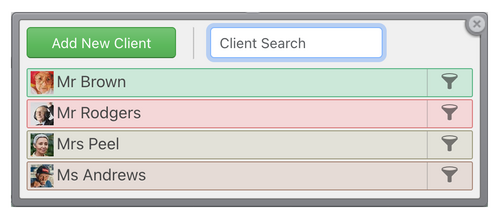
Each client has a record with their name, telephone number, email address, an ID and a photo. Add a description for anything staff need to know, and notes that only managers can see.
Clients on the rota
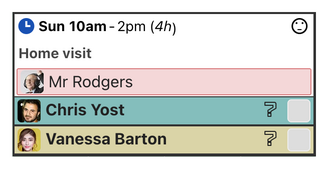
Assign one or more clients to a shift in the same way you assign staff. Filter the rota by a client to see only their shifts, and set a shift to repeat with its client so a regular visit stays on the rota.
If a client is booked on two shifts at the same time, Rotaville can allow it, warn you, or block it. Print a schedule for each client, and export hours per client to CSV.
The introduction of Rotaville to Thorpe Woodlands has revolutionised how the centre operates. For years we struggled with Excel spreadsheets which were constantly being updated and re-printed. Rotaville has saved us time and money. All of our staff know when they are working, the name of the client they are working with and the activities for the day. For us, the most useful aspect of Rotaville is having the ability to quickly look at staff availability and to calculate hours worked through the shift reports. I genuinely cannot imagine life without Rotaville.

Tim Edmonds
Centre Manager
Thorpe Woodlands Adventure Centre
What staff see
Staff see the clients on their own shifts, and you choose whether they can see your whole client list. Client email addresses and telephone numbers stay hidden from staff unless you change that in the workforce settings.
Common questions
Can two members of staff visit the same client?
Yes. Assign as many staff as the visit needs to the same shift as the client.
Where do I keep details staff need, such as a key safe code?
In the client's description, which staff who can see the client can read. Use notes for anything only managers should see.
Can I print a client's schedule?
Yes. Print it as a PDF for a week, a month or any dates, and export the client's hours to CSV.
The clients and resources video shows how to add clients, and double assignments explains the allow, warn and block settings.
21 days free. No card needed.